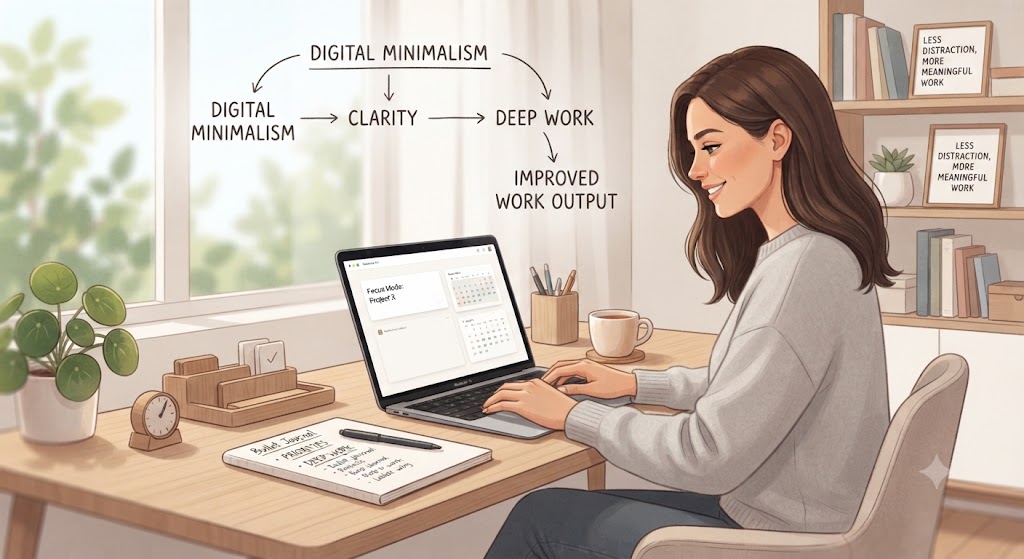
Digital minimalism is becoming an increasingly practical approach for professionals who want to improve work output without simply working longer hours. Modern workplaces depend on emails, messaging applications, project management platforms, social media, video meetings, cloud storage, and multiple digital tools. Although these technologies can improve efficiency, excessive digital activity can also create distractions and reduce concentration.
Digital minimalism focuses on using technology intentionally rather than allowing every application, notification, and communication channel to demand attention. The objective is not to stop using technology. Instead, it is to identify which digital tools genuinely contribute to your work and reduce unnecessary digital activity.
For remote professionals, freelancers, entrepreneurs, and office workers, digital minimalism can create a more organized working environment. With fewer distractions and clearer priorities, professionals can spend more time on meaningful tasks and less time switching between applications.
1. Understand What Digital Minimalism Means
Digital minimalism is an approach to technology use that prioritizes essential digital activities while reducing unnecessary ones. Instead of automatically using every available platform, professionals evaluate whether a particular tool improves productivity or creates additional distractions.
For example, checking email every few minutes may feel productive, but frequent interruptions can make it harder to complete focused work. Similarly, keeping multiple communication applications open can create constant pressure to respond.
A practical digital minimalism strategy starts with identifying your essential tools.
Ask yourself:
- Which applications do I use every day?
- Which tools directly support my work?
- Which notifications interrupt important tasks?
- Which platforms create unnecessary activity?
- Which digital tasks can be combined or removed?
The goal is to create a simpler digital environment that supports your most important responsibilities.
2. Reduce Digital Distractions During Work
One of the easiest ways to apply digital minimalism is to reduce unnecessary interruptions.
Notifications can divide attention throughout the day. Even when a notification takes only a few seconds to check, returning to a complex task can take significantly longer.
Start by turning off non-essential notifications.
Keep notifications for genuinely important activities, such as urgent work messages or critical calendar reminders. Disable alerts from social media, promotional emails, entertainment applications, and other non-essential services during working hours.
You can also create specific communication periods.
For example:
- Check email at the beginning of the workday.
- Review messages after completing a major task.
- Reserve a short period for administrative work.
- Keep focused work sessions notification-free.
This creates clearer boundaries between communication and deep work.
Digital minimalism works best when distractions are reduced before they interrupt your attention.
3. Simplify Your Digital Workspace
A cluttered digital workspace can make work more difficult. Too many browser tabs, desktop files, applications, bookmarks, and communication channels can increase cognitive load.
Create a simple digital workspace that contains only the resources you need for current projects.
Organize your workspace into clear categories such as:
- Current projects
- Reference materials
- Completed projects
- Administrative documents
- Personal files
- Archived information
Close browser tabs that are not related to your current task. Save useful resources in organized folders instead of keeping them open indefinitely.
You should also review your applications regularly. If two applications perform similar functions, determine whether you actually need both.
For example, using several task-management systems can create duplicated work. One reliable system is often easier to maintain than multiple disconnected platforms.
A simpler workspace makes it easier to identify priorities and begin important tasks without unnecessary searching.
4. Use Digital Tools More Intentionally
Digital minimalism does not mean avoiding technology. Instead, it means choosing technology based on purpose.
Before adding a new application to your workflow, ask whether it solves a specific problem.
Consider these questions:
- What problem does this tool solve?
- Is the problem significant enough to require another tool?
- Does the application duplicate an existing system?
- Will it save time over the long term?
- Does it create additional notifications or administrative work?
For remote workers, this evaluation is particularly important. Remote teams may use separate platforms for messaging, meetings, project management, documentation, file storage, and reporting.
When too many platforms are used without clear rules, employees may spend excessive time checking information instead of completing work.
Create simple rules for each tool. For example, one platform can be used for urgent communication, another for project tasks, and another for documentation.
Clear boundaries reduce confusion and improve productivity.
5. Create Focused Work Sessions
Digital minimalism can be especially effective when combined with focused work sessions. Instead of constantly switching between tasks, dedicate specific periods to important responsibilities.
Start with a realistic schedule.
For example:
Morning: High-priority creative or analytical work.
Midday: Meetings and collaboration.
Afternoon: Administrative tasks, email, and follow-ups.
End of day: Planning and review.
During focused work sessions, keep unnecessary applications closed. Put your phone away if it is not required for work.
You can also divide larger projects into smaller milestones. Completing one defined stage at a time makes it easier to maintain concentration.
For remote professionals, this structure is particularly useful because home environments can contain additional distractions. A defined digital routine creates a clearer separation between focused work and casual internet use.
The objective is not to eliminate flexibility. Instead, it is to give every type of work an appropriate time and level of attention.
6. Apply Digital Minimalism to Remote Work and Travel
Digital minimalism can become even more valuable when working remotely or traveling. Professionals who work from different locations often need to manage communication, connectivity, work equipment, and changing schedules.
Before working from a new location, conduct a short travel test. Work there for several days and evaluate whether your digital setup supports your responsibilities.
Check:
- Internet reliability
- Workspace quality
- Video meeting performance
- File access
- Backup connectivity
- Time-zone differences
- Noise levels
- Daily productivity
Travel can introduce additional digital distractions. Instead of constantly researching restaurants, transportation, activities, and social media content during work hours, schedule personal browsing for designated periods.
Create a travel-friendly digital workspace with only essential applications and documents.
A global job platform such as best job tool can help remote professionals explore international employment opportunities, but the same principle applies: use digital platforms intentionally rather than constantly browsing job listings without a defined goal.
7. Measure Results and Improve Your Digital Routine
Digital minimalism should produce measurable improvements. After simplifying your digital environment, track whether your work output actually improves.
Monitor practical indicators such as:
- Tasks completed each day
- Time spent in meetings
- Time spent checking email
- Number of major tasks completed
- Missed deadlines
- Focused work hours
- Unplanned screen time
At the end of each week, review your results.
Ask:
Did I complete important work faster?
Did unnecessary communication decrease?
Did I experience fewer interruptions?
Did my work quality improve?
Which digital tools were genuinely useful?
Use the answers to refine your workflow.
Financial planning can also benefit from digital minimalism. Review recurring subscriptions and software expenses regularly. Remove tools that are no longer necessary. This can reduce unnecessary business or personal expenses while keeping your technology budget focused on useful services.
Over time, the goal is to create a digital environment that supports productivity rather than constantly competing for attention.
Conclusion
Digital minimalism can help professionals improve work output by reducing distractions, simplifying digital tools, and creating clearer boundaries around technology use. It is not about avoiding technology. Instead, it is about using technology with greater intention.
Start by identifying your essential digital tools and removing unnecessary notifications. Then simplify your digital workspace, create clear rules for communication platforms, and establish focused work sessions.
Remote professionals can apply the same principles while traveling by testing internet reliability, workspace quality, time-zone compatibility, and digital workflows before committing to longer stays.
Finally, measure the results. Track completed tasks, focused work time, communication habits, and unnecessary digital activity. Review your subscriptions and technology expenses as well.
The most effective digital minimalism strategy is practical and sustainable. By keeping only the technology that genuinely supports your goals, you can create a calmer digital environment, protect your attention, and improve the quality and consistency of your work output.


Leave a Reply