Introduction: Otter.ai
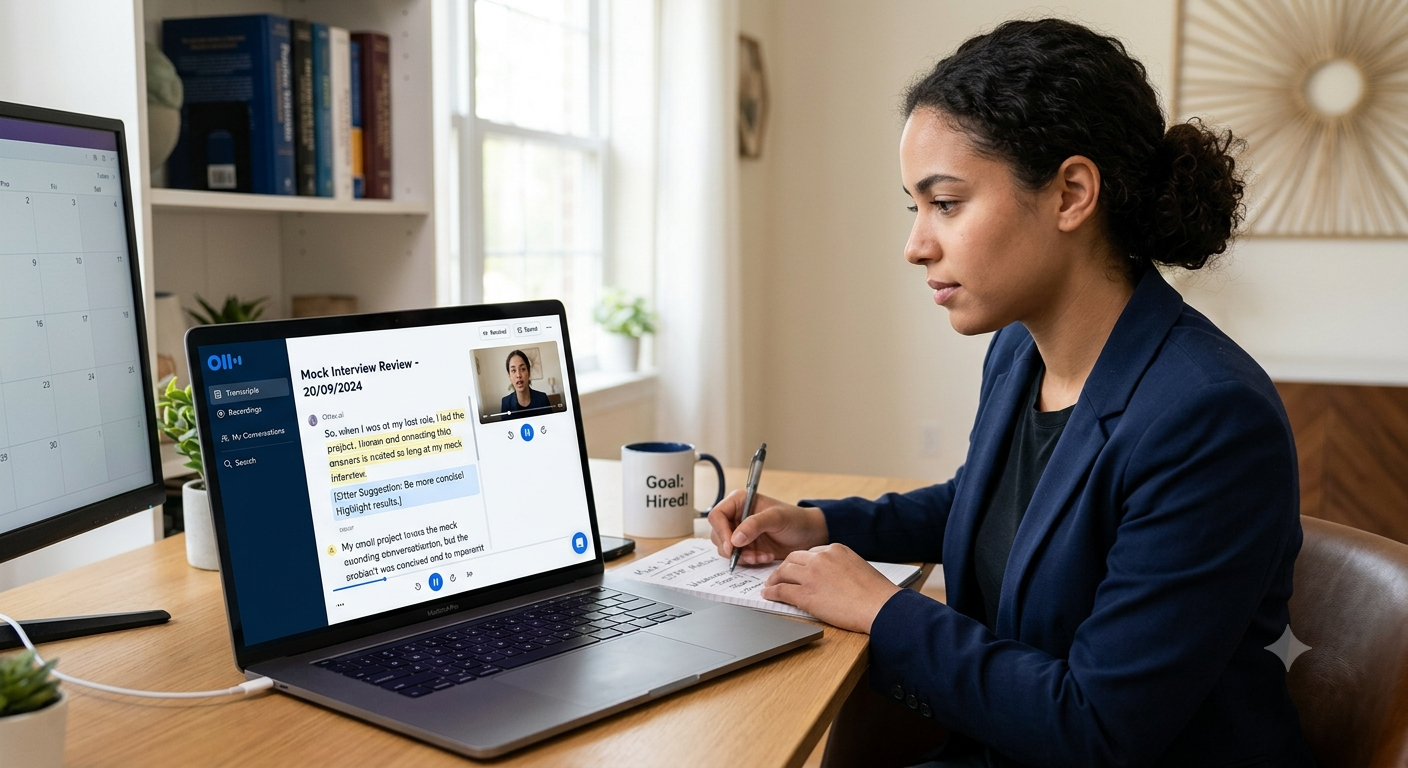
Preparing for a job interview can entail a lot of practice, preparation, and perseverance. Practicing answers to common questions is a vital component of acing an interview, but it is just as crucial to review one’s performance to ensure that there are no major kinks to iron out later. In particular, Otter.ai’s ability to transform conversations to text could help job seekers to review their mock interview answers, spot areas of improvement, and even measure their progress throughout the process.
How to Use Otter.ai to Review Your Mock Interview Answers?
1. Prepare Your Otter.ai Account
First, set up an account at Otter.ai and familiarize yourself with the interface and the features that come with your plan. Some accounts offer the ability to dictate conversations, while others let you upload audio or video files, depending on your device.
Prepare questions for the mock interview. Practice in a well-lit room, with your voice recorder ready to catch everything in high quality. Ask a friend or a professional, such as a career counselor, to help you if possible, and ensure that they give you permission to record the conversation. A good setup will enable you to practice efficiently and receive a high-quality transcript that is easier to review and analyze.
2. Record Your Mock Interview Session
Next, use Otter.ai to record your answers to the questions that you have prepared, or ask someone to record the conversation for you, if the tool allows it.
One may practice alone, responding to questions out loud, or recruit another person to act as an interviewer. Either way, treat the practice session as a real interview and do not read from notes.
Recordings offer a valuable opportunity to reflect on what went well and what did not go well. After all, we can forget even the most trivial details, for example, what and when exactly a person said. By listening to the recording several times, one can simply verify the information instead of relying only on memory. They will be available for rechecking.
It is possible to replay and review the recordings more than once instead of trying to memorize the details.
3. Review for Answer Clarity
After the recording is complete and you have received a transcript, go through the text and ensure that your answers are clear and concise. In particular, ensure that you address each question head-on and do not beat around the bush.
Some people have a habit of including irrelevant information in their answers. This is especially true for questions such as “Tell me about yourself,” in which one may describe personal interests and hobbies, which have nothing to do with the job at hand. The transcript can help to identify and subsequently eliminate such detours.
4. Identify Filler Words and Repetitive Words
Filler words are a part of everyday conversation, but as they make speech sound less polished, it is important to limit their use in a professional setting. Some of the most common words and phrases include “um,” “uh,” “like,” “you know,” etc. Otter’s transcripts may contain some of these words, as the tool is not always perfect at identifying nonverbal cues.
However, listening to the recording can help you identify repetitive words and phrases and remove them from your final response. For instance, instead of saying, “I think that my biggest strength is communication,” one may say, “My biggest strength is communication.”
Of course, one cannot eliminate all pauses, as they are natural, but the goal is to minimize repetitions and use them only when absolutely necessary, such as to express hesitation or emphasize a point.
5. Evaluate the Structure of Your Answers
Good interview answers should be easy to follow. Using Otter.ai’s transcripts, evaluate whether yours make sense and highlight your strengths, relevant skills, and positive qualities.
Where appropriate, use the STAR method to structure your answers, which stands for Situation, Task, Action, and Result. Essentially, you should briefly describe the situation, explain the tasks you undertook, and outline the actions you took to achieve the desired result. For instance, a response to a behavioral interview question may look something like this:
“I was given a challenging assignment at work. The task was to X. To achieve the desired result, I had to Y. As a result, Z happened.” Use the transcript to ensure that all parts of your response have been included. If they are missing, revise them so that your answers follow this or another recognized format.
6. Determine Whether the Examples Are Relevant
Interviewers are looking for answers that showcase one’s skills and competencies, which means that it is important to ensure that the examples are relevant and support the desired point. Again, transcripts may be used to go over the answers and ensure that each of them has a pertinent example, which demonstrates the necessary skill. Furthermore, ask yourself whether the example illustrates your contribution and the result that it led to.
Where appropriate, back up your claims with relevant, measurable, and verifiable facts and statistics. For instance, instead of stating, “I improved the customer service experience,” say, “I improved the customer service experience by X%,” and describe the particular initiative that led to the improvement. Avoid exaggerating and overinflating the results, and always speak objectively.
7. Practice Talking Faster and Slower
The speaking pace is yet another important element of an interview, as it can dictate the flow of the conversation. If one speaks too fast, the interviewer may not be able to follow the responses, and if one speaks too slow, they may interrupt too often, which may indicate that they are bored.
Listen to the mock interview recording that you have saved and try to speak faster or slower, depending on your speaking habits. For instance, if you tend to ramble, practice shortening your answers and using pauses to emphasize key points. On the other hand, if you speak very fast, practice enunciating each word clearly. Although Otter.ai is not a speech coach, by listening to your recorded answers, you will be able to spot some issues and work on them.
8. Ask Another AI Tool to Review Your Answers
At this point, you may want to ask another AI tool to go over your answers. Simply copy a relevant segment of your Otter transcript and ask for suggestions, such as, “Review this mock interview answer for a [position] job. Please provide your thoughts on the strengths, weaknesses, clarity, relevance, and areas of improvement. Suggest a version that is more concise, relevant, and professional while retaining my actual experience. I do not want you to make up achievements.”
You may also ask for advice on how to improve STAR answers or prepare for follow-up questions. Bear in mind that Otter’s transcription tool is not the same as a dedicated interview coach, so it is important to fact-check any suggestions and ensure that no private or sensitive information has been shared in the process.
9. Keep Track of Improvements
Finally, make sure to note every weak spot that you discover during the review process. In particular, keep track of the weak points that were identified in your answers and work on them during the next practice session. For instance, if your answers were too long the first time, try to shorten them during the second session.
Compare the first session to the second one, and so on, using transcripts that have been generated by Otter.ai. In particular, note whether the answers are becoming more concise, relevant, clear, and properly structured. It may be helpful to keep a progress journal that consists of four columns: the question, the weak point, the improvement that you have made, and the results. This way, each step in the process will be clearly defined.
Conclusion: Otter.ai
Otter.ai can be used to make mock interview preparations more efficient by transforming speech to text into a format that is easier to analyze. From learning to avoid conjunctions and other useless words and perfecting one’s structure of responses, to practicing examples and measuring progress, everything can be done through this tool.
By following all ten points, one can learn to respond more efficiently and prepare themselves for an actual interview with potential employers. By using Otter.ai in combination with self-analysis, practice, and feedback, one can maximize their mock interview experience and improve their performance on actual interviews with prospective employers.
Ready to ace your next interview? Combine Otter.ai with the Best Job Tools to refine your answers, strengthen your interview skills, and discover exciting career opportunities. Start practicing today and take a confident step toward landing your dream job!


Leave a Reply