
Introduction
In today’s competitive job market, thousands of people apply for the same role, making it challenging for anyone to stand out. However, candidates with practical skills have a clear advantage—they can showcase real value from day one. Employers prefer candidates who are ready to work with practical knowledge, and Excel is one such skill that is highly demanded across almost every industry and role.
Many people assume that it is only useful for accounting or data-related jobs. In reality, it is essential in every sector—marketing, HR, finance, operations, sales, healthcare, education, government, and startups. It helps professionals handle data efficiently, create meaningful reports, and support decision-making.
In this article, we will explore how learning Excel can boost your job chances, especially for freshers, and how it can contribute to long-term career growth and success.
Why Learning Excel Boosts Job Chances Across Industries?
1. Excel as a Universal Skill Across Industries
Many people think that Excel is only limited to accounting or data-related jobs, but in reality, it is a daily-use tool in almost every industry and in every department. Whether you are in a creative field or in a non-technical role, It helps you to understand, manage, and present data. That’s why it has become a cross-industry employability skill.
Excel is not limited to numbers only in marketing. Marketers track campaign performance through Excel, such as impressions, clicks, conversions, and ROI. You cannot do comparisons of different campaigns, create monthly performance reports, or analyze audience data without Excel. It helps marketing professionals to take data-driven decisions.
It works like a backbone in human resource roles. Maintaining employee data, tracking attendance, salary sheets, and hiring trackers are all managed in Excel.
Apart from these, Excel is used in sectors like healthcare, education, government, and startups. In the healthcare sector, it is used to record patient details. In the education sector, Excel is used to record student data and results, and in government offices, Excel is used for records and schemes.
2. Why Employers Prefer Excel-Skilled Candidates
Employers do not only see degrees or experience; they also evaluate candidates for handling real work efficiently. Excel skills meet these practical expectations. In today’s fast-paced work environment, companies prefer those who can work confidently with data.
Firstly, faster data handling and reporting are very important for employers. Excel-skilled candidates can easily and quickly organise raw data, perform calculations, and create clear reports. Through this, candidates can give updates to managers on time, which reduces delays in decision-making.
Secondly, a major reason is better decision-making support. It is not just a tool to calculate numbers; it is also a medium to take out insights. When employees see trends, patterns, and comparisons through Excel, decision-making becomes very easy for management. That’s why Excel-skilled candidates are important.
If candidates know Excel, then they do not have to depend on any other senior or department. They can clean data, create summaries, and find answers on their own.
Productivity and accuracy are also directly linked with these skills. There is risk associated with manual calculations and repetitive tasks, which is reduced by Excel formulas and functions.
Overall, Excel-skilled candidates are not just tool users; they are also problem solvers and analytical thinkers. That’s why employers prefer them more.
3. Excel Improves Job Readiness for Freshers
In the case of freshers, the biggest concern for employers is whether a candidate will be able to apply theoretical knowledge to real workplace tasks. The concepts taught in college or online courses are often very different from practical work situations. Excel helps bridge this gap by making freshers more job-ready and prepared for real responsibilities.
Freshers who know can confidently handle real datasets. Workplace data is rarely perfect or clean; it often contains errors, missing values, and inconsistencies. With the help of Excel’s basic tools like sorting, filtering, and organizing data, freshers can manage such data efficiently and work with greater confidence.
One of the biggest advantages is that freshers can create reports without extensive training. Companies expect entry-level employees to prepare daily or weekly reports. When a candidate is already comfortable using Excel, there is no need to teach the same tasks repeatedly, which saves both time and resources for the employer.
It also helps freshers understand business numbers such as sales figures, expenses, targets, and growth percentages. This understanding allows them to see how their work contributes to overall business performance. That is why it is not just a technical skill—it is a job-readiness tool for freshers. Candidates who know how to use Excel can start adding value from their very first day at work.
4. Resume and Interview Advantage of Excel
Excel also plays an important role in resume selection and interview performance. In today’s highly competitive job market, hundreds of resumes are submitted for a single role.
Firstly, Excel is an important keyword for an ATS-friendly resume. Many companies use Applicant Tracking Systems (ATS) that scan resumes based on specific keywords. When terms like Microsoft Excel, Advanced Excel, Data Analysis, or Reporting are included in a resume, the chances of shortlisting increase—whether the role is technical or non-technical.
At the interview stage, many recruiters conduct practical Excel tests. These tests are not limited to formulas or functions. Instead, recruiters observe how a candidate approaches data, understands the problem, and presents the solution in a structured way.
In common Excel-based interview tasks, candidates may be asked to sort or filter data, apply simple formulas, or create basic reports and charts. Sometimes, interviewers provide a raw dataset and ask candidates to create a meaningful summary from it. Candidates who know Excel are able to handle these tasks calmly and confidently.
Overall, it makes a resume stronger and shows that a candidate is confident, prepared, and job-ready. That is why it is not just a skill—it is a selection advantage in today’s job market.
5. Productivity and Workplace Efficiency Through Excel
In today’s workplace, success does not only mean hard work; it also means smart work. Excel makes smart work possible. Employees who know how to use can complete the same tasks in less time and with greater accuracy.
One of the biggest advantages of is the automation of repetitive tasks. Work that earlier required manual effort again and again—such as daily calculations, monthly reports, attendance sheets, or sales tracking—can now be handled easily using Excel formulas and features. This not only saves time but also reduces the chances of human error.
Workplace data is often messy and unorganized. Excel helps employees clean, sort, and structure this data so that it becomes meaningful and usable. When data is organized properly, employees can work more efficiently and make better decisions.
6. Career Growth and Promotion Opportunities
The impact of Excel is not limited to getting a job. Its real value begins when you start using Excel in the workplace to build visibility, ownership, and trust. It also plays an important role in long-term career growth and promotions.
When employees take ownership of reports—such as weekly performance reports, monthly summaries, or tracking sheets—managers receive reliable and consistent output. Excel-skilled professionals create reports that are well-structured, accurate, and easy to understand through clear tables and charts. This reliability helps build trust with managers.
It also helps employees provide insight support to management. Through Excel, employees can identify trends in data, show comparisons, and explain the reasons behind performance changes. When employees support managers with insights instead of just raw data, they become part of strategic conversations, which is a key factor in career growth.
During performance reviews, these skills help employees stand out. When your work is presented with numbers, reports, and measurable impact, managers can clearly see your contribution. This visibility plays a major role in promotions, appraisals, and increased responsibilities.
Overall, strong Excel skills reflect leadership, initiative, and accountability. Employees who use it effectively are often seen as problem solvers and future leaders—making Excel not just a technical skill, but a powerful career-building tool.
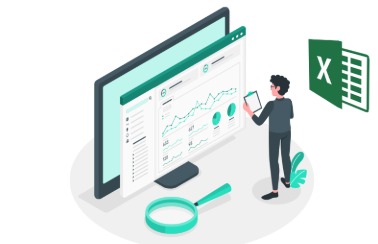
Key Excel Topics to Learn for Job Success
Learning Excel becomes truly valuable when you understand which feature to use in the workplace and why. Simply memorizing formulas or tools is not enough. Employers want to see whether you can apply practically to solve real work problems.
Below are key topics that are highly useful in real jobs:
- Basic formulas and functions such as SUM, AVERAGE, and IF help in everyday calculations and decision-making tasks.
- Data sorting and filtering make it easier to organize large datasets and focus only on relevant information.
- VLOOKUP and XLOOKUP are widely used to match and retrieve data from different tables.
- One of the most powerful Excel features is Pivot Tables, which help summarize large amounts of data quickly and clearly.
- Charts and data visualization are important for presenting information in an easy-to-understand visual format.
- Conditional formatting is used to highlight important values, trends, or exceptions in data.
- Basic data cleaning helps remove errors, duplicates, and inconsistencies from raw datasets.
In short, these topics do more than provide technical knowledge. They reflect your job readiness, analytical thinking, and problem-solving ability. That is why these skills are essential for career success across industries..
Visit Excel to learn through here.
Conclusion
Excel is much more than just a spreadsheet tool—it is a career-enabling skill that increases employability across industries. From helping freshers become job-ready to enabling professionals to work efficiently, analyze data, and support decision-making, It plays a crucial role at every career stage. Employers value Excel-skilled candidates because they save time, reduce errors, and bring clarity to complex information.
Learning Excel not only improves chances of getting hired but also supports long-term career growth by building confidence, independence, and leadership potential. Whether you work in marketing, HR, finance, operations, sales, or any other field, it helps you add measurable value to your role.
In a job market where skills matter more than titles, Excel stands out as a universal, practical, and future-ready skill. Investing time in learning is not just about mastering software—it is about preparing yourself for better opportunities, stronger performance, and sustained career success.
You can read more informative blogs here.


Leave a Reply